On this page
Affiliate disclosure: Some links on this page are affiliate links. If you sign up through them, we may earn a commission at no extra cost to you. It does not change what we write. NextGrowthPilot is independent and is not the official MailerLite website. Research note: This review is based on MailerLite's official pricing page, plan comparison table, feature pages, help center and legal pages, checked on November 14, 2026. We have not run a live list on MailerLite for this review, so we make no claims about deliverability, open rates or support response times.
Quick verdict
Is MailerLite Worth It? Our Quick Verdict
If email is the main way you talk to your audience, MailerLite is one of the easiest tools to recommend. It gives you a polished email editor, automations, signup forms, landing pages and a website builder, and it keeps the starting price low: $12 a month for 500 subscribers, or $10.80 a month billed yearly.
Its biggest advantage is that the paid plans don't hold back the core tools. Segments and tags are unlimited even on Free, and MailerLite says every paid plan gets its full feature set; what changes between Comfort and Power is mostly capacity: sending volume, number of automations, sites, forms, products and team seats.
The limits show up in two places. The free plan caps you at 250 subscribers, and sending is locked once you pass it. And MailerLite is still an email tool first: you can sell digital products, paid newsletters and bookings through Stripe, but there are no upsell funnels, no order bumps, no course hosting and no physical product store.
If you mainly sell courses or run funnels, an all-in-one platform will likely cost you less overall. If your list is large and you email daily, compare the Comfort sending cap with Power before you choose.
MailerLite is a strong fit if…
- You publish a newsletter or send regular campaigns, and email is your main channel.
- You want automations, segments and A/B tests without paying enterprise prices.
- You need simple landing pages, a website or a few digital products next to your list.
- You want a tool a beginner can learn in an afternoon.
Look elsewhere if…
- You sell courses or coaching through funnels with upsells and order bumps.
- You need deep automation with lead scoring or a built-in sales CRM.
- You can't use Stripe in your country and need to sell through MailerLite.
- Your list is already well past 250 subscribers and you need to stay at $0.
The basics
What Is MailerLite?
MailerLite is an email marketing platform for creators, small businesses and lean marketing teams. Its core job is the one most online businesses need first: collect subscribers, send them newsletters, and run automated email sequences.
Around that core, MailerLite has added the tools that usually sit next to an email list: signup forms and pop-ups, landing pages, a website builder with a blog, and simple monetization through digital products, paid newsletters, recurring subscriptions and paid bookings. Payments run through Stripe.
The model is easy to follow. You pay for the size of your list and how much you send, not for access to features. The Free plan is a small working account. Comfort is the full toolset with sensible caps. Power removes most caps and adds unlimited sending, multiple automation triggers and 24/7 live chat. Enterprise is custom pricing above 200,000 subscribers.
What problem does it solve? For a creator or small business, it replaces a stack of an email tool, a form tool and a simple site builder with one affordable account. It does not try to be a funnel builder, a course platform or a sales CRM, and that focus is both its strength and its main limit.
Features
MailerLite Features: What Each Tool Does and Where It Stops
Plan limits come from MailerLite's official plan comparison table and plan descriptions, checked on November 14, 2026, and are listed as Free / Comfort / Power. Where the table only shows a check mark, we describe the feature without claiming more than MailerLite states.
Email campaigns and editors
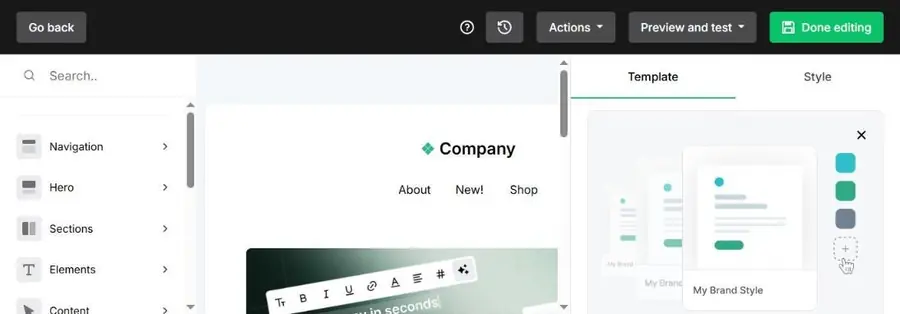
MailerLite gives you three ways to build an email: a drag-and-drop editor, a simple text-style editor for plain newsletters, and a custom HTML editor. All three are on the free plan. Emails are mobile-friendly, and there is a free stock image library.
For a newsletter writer this matters more than it sounds. You can send a designed promotional email one day and a plain, personal note the next, without changing tools. Paid plans add unlimited templates, the AI writing assistant, smart sending, multivariate testing and the ability to edit links in a campaign after it has gone out.
The limits: Free has a limited template set and 2,500 emails a month. On Comfort, monthly sending is capped at 10 times the top of your subscriber tier, so a 1,000-subscriber Comfort account can send 10,000 emails a month. If you email a large list several times a week, Power's unlimited sending (under a fair use policy) is the safer choice.
Best for: newsletter writers, bloggers and businesses that send regular campaigns.
Automation
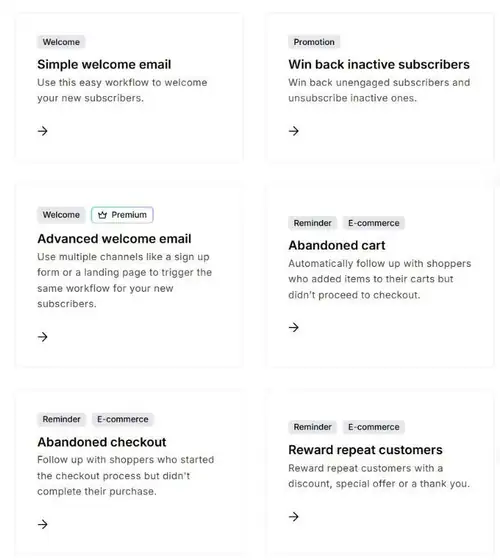
Automations are built in a visual builder. A workflow starts from a trigger, such as joining a group, filling in a form, clicking a link, a date or a purchase, and then sends emails, waits, checks conditions or moves subscribers between groups.
Typical uses are a welcome series, a lead magnet delivery, a post-purchase follow-up or a re-engagement sequence. Ecommerce triggers, RSS campaigns and auto-resend campaigns (for people who didn't open) are listed in the comparison table, and the digital products page describes abandoned cart emails.
The limits: Free allows 3 active automations with up to 5 steps each, enough for a short welcome sequence. Comfort raises it to 50 automations with 100 steps; Power is unlimited and adds multiple triggers per automation. There is no lead scoring. If you need that, or behavior-based scoring tied to sales, look at ActiveCampaign.
Best for: creators and small businesses that need dependable sequences, not complex customer journeys.
Subscribers, segments and personalization
Subscribers can be organized with groups (MailerLite's tags) and dynamic segments that update themselves based on rules. Both are unlimited on every plan, including Free.
That is unusual at this price. Many tools limit segmentation on cheaper plans, and it is the feature that lets you send fewer, more relevant emails. Paid plans add dynamic email content, a subscriber preference center, a custom unsubscribe page, surveys, quizzes and delivery by time zone.
The limits: billing counts every subscriber who was active at any point in your billing cycle, even if you delete them later in that cycle. Clean your list right after your billing date, not right before it.
Signup forms, pop-ups and landing pages
You can build embedded forms, pop-ups and promotion pop-ups, and A/B test forms. Landing pages use templates and a drag-and-drop builder, with an AI landing page builder and A/B split testing listed in the comparison table.
For list building, this covers most needs without a separate tool: a lead magnet page, a webinar sign-up page or a pop-up on your blog, all feeding the same subscriber list.
The limits: Free allows 3 active forms and 1 landing page; Comfort 10 forms and 10 sites and landing pages; Power is unlimited. The AI landing page builder can be used once on Free.
Website builder and blog
MailerLite includes a website builder with templates, a blog section, SEO settings, custom domains, password-protected pages and custom code injection.
It suits a creator or small business that needs a simple site where the newsletter is the center: a home page, about page, blog and product pages.
The limits: Free includes 1 website; Comfort counts websites and landing pages together, up to 10. It is not meant to replace WordPress for a content-heavy site. If you are choosing a site platform, see our best website builders list.
Digital products, paid newsletters and bookings
You can sell digital products, paid newsletter subscriptions, recurring subscriptions and paid bookings from MailerLite. Files such as PDFs, EPUBs and images can be hosted directly; for video or other files, you deliver a link after purchase.
MailerLite says it charges 0% commission on these sales, so you pay only your plan and Stripe's processing fees. Sales also trigger automations, which makes a simple sell-and-follow-up flow easy to set up.
The limits: payments run only through Stripe, and MailerLite's own FAQ notes that Stripe is not available in every country. Physical products are not supported. There are no upsells, order bumps or course hosting. Products and bookings are capped at 1 / 5 / unlimited, and MailerLite's digital products page lists paid newsletters from Comfort. If selling is the main job, read our Systeme.io review.
Best for: writers, coaches and creators selling a few products or a paid newsletter to their list.
Reporting
Reports cover opens, clicks, click maps, list growth, individual subscriber activity, ecommerce sales tracking and real-time automation reports, with comparative reporting across campaigns.
The limits: custom date ranges and custom report exports are listed in the comparison table, but MailerLite's public table does not make clear on which plan each one starts. Check in your account during the 14-day trial if exports matter to you.
Integrations, API and AI tools
MailerLite lists 100+ integrations, including Stripe, Shopify and WooCommerce, plus an API, webhooks and an MCP server for Claude, ChatGPT and other AI tools. Paid plans also get HeyLite, MailerLite's AI features.
The limits: on Free, API and MCP access is limited and does not include sending. Transactional emails such as receipts and password resets are not part of MailerLite's marketing plans; they are offered through MailerLite's sister product, MailerSend.
Try the paid features before you pay
Every new account gets a 14-day trial of premium features, with no credit card required. Your data stays if you don't upgrade.
Pricing
MailerLite Pricing and Plans (Verified November 2026)
Prices and limits come from MailerLite's official pricing page and plan comparison table, checked on November 14, 2026. Prices are in USD and may be subject to tax. Paid prices below are for 500 subscribers.
Free
$0
Free forever, no credit card
- 250 subscribers, 2,500 emails a month
- 3 automations, 3 forms
- 1 website and 1 landing page
- 1 digital product or booking
- Sending locks above 250 subscribers
- MailerLite logo on emails
Best for: starting a list and learning the tool.
Comfort
$12/mo
$129.60 billed yearly ($10.80/mo)
- 5,000 emails a month at 500 subscribers
- 50 automations, 10 forms
- 10 websites and landing pages
- 5 digital products, 3 seats
- Unlimited templates, no logo
Best for: most newsletters and small businesses.
Power
$25/mo
$270 billed yearly ($22.50/mo)
- Unlimited monthly emails (fair use)
- Unlimited automations, forms and sites
- Multiple automation triggers
- Unlimited seats and products
- 24/7 live chat support
Best for: frequent senders, teams and sellers.
Enterprise
Custom
For 200,000+ subscribers
- Custom sending volume
- Dedicated success manager
- Dedicated IP (add-on)
- Deliverability support and account audits
Best for: very large lists.
How MailerLite pricing works
You pay for active subscribers and sending volume, not for features. Unsubscribed and bounced contacts don't count, but anyone who was active at any point in a billing cycle does, even if you delete them later. On paid plans, MailerLite moves you to the next tier automatically when your list grows past your limit and charges the new price.
Price by list size
This is where MailerLite's low entry price changes shape. Comfort roughly doubles from 1,000 to 2,500 to 5,000 subscribers, and at 10,000 subscribers it costs $89 a month. The gap to Power narrows as the list grows: $13 at 500 subscribers, but $20 at 5,000.
Monthly price by list size (yearly price per month in brackets)
| Subscribers | Comfort | Power |
|---|---|---|
| 500 | $12 ($10.80) | $25 ($22.50) |
| 1,000 | $19 ($17.10) | $39 ($35.10) |
| 2,500 | $33 ($29.70) | $49 ($44.10) |
| 5,000 | $49 ($44.10) | $69 ($62.10) |
| 10,000 | $89 ($80.10) | $129 ($116.10) |
| 25,000 | $179 ($161.10) | $239 ($215.10) |
| 50,000 | $319 ($287.10) | $389 ($350.10) |
Monthly vs annual billing
Yearly billing saves 10%. You can switch from monthly to annual immediately, but a switch from annual to monthly, or a downgrade, only takes effect when the current billing period ends. MailerLite applies one discount at a time; nonprofits can apply for 30% off paid plans.
Refunds
Plan for no refunds. MailerLite's refund policy says it does not refund unused or partly used plans, plans bought by mistake, or cancellations because of functionality. It mentions a 14-day refund right for individuals who use the service for non-business purposes. Use the 14-day premium trial to test before you pay, especially before an annual plan.
When you will need to upgrade
From Free, the trigger is usually your 251st subscriber, because sending stops until you upgrade or remove subscribers. From Comfort, it is either the monthly sending cap or needing more than 50 automations, 10 forms, 5 products or 3 seats.
Is MailerLite good value for money?
For email-first businesses with small and mid-sized lists, yes. Comfort includes the tools many competitors reserve for higher tiers, such as unlimited segments, A/B testing and a website builder. At 10,000 subscribers and above, prices are closer to the rest of the market, so compare the exact tier you expect to reach in a year, not just the entry price.
Key plan limits
| Limit | Free | Comfort | Power | Enterprise |
|---|---|---|---|---|
| Price (500 subscribers) | $0 | $12/mo, or $10.80/mo yearly | $25/mo, or $22.50/mo yearly | Custom |
| Subscribers | Up to 250 | Priced by list size | Priced by list size | 200,000+ |
| Monthly emails | 2,500 | 10× your subscriber tier | Unlimited (fair use) | Custom volume |
| Active automations | 3 (5 steps each) | 50 (100 steps) | Unlimited | Unlimited |
| Multiple automation triggers | No | No | Yes | Yes |
| Websites and landing pages | 1 + 1 | 10 | Unlimited | Unlimited |
| Active forms | 3 | 10 | Unlimited | Unlimited |
| Digital products and bookings | 1 | 5 | Unlimited | Unlimited |
| User seats | 2 | 3 | Unlimited | Unlimited |
| Segments and groups | Unlimited | Unlimited | Unlimited | Unlimited |
| Templates | Limited | Unlimited | Unlimited | Unlimited |
| Remove MailerLite logo | No | Yes | Yes | Yes |
| API and MCP | Limited, no sending | Full | Full | Full |
| Support | Knowledge base | 24/7 live chat and email | Priority, dedicated |
Pricing note: MailerLite can change prices and limits at any time, and prices may be subject to tax. Verify current details on the official pricing page before you buy. Last checked: November 14, 2026.
Check the price for your list size
MailerLite's pricing page shows the exact price for your subscriber count. Start free, then upgrade when you pass 250 subscribers.
Strengths and limits
MailerLite Pros and Cons
Pros
Low entry price for real features $12 a month (or $10.80 yearly) buys 50 automations, 10 landing pages and sites, and unlimited templates. Most small newsletters can stay on Comfort for a long time.
Unlimited segments on every plan Dynamic segments and groups are not rationed, even on Free, so you can send targeted emails from day one.
Three editors in one tool Drag and drop for designed emails, a simple editor for personal newsletters, and HTML for full control.
0% MailerLite fee on product sales Sell digital products, bookings and paid newsletters while paying only Stripe's processing fees.
Free 14-day premium trial Try paid features without a card, and keep your data if you don't upgrade.
Cons
Small free plan 250 subscribers and 2,500 emails a month. Past 250 subscribers, sending locks until you pay.
Comfort caps sending 10 times your subscriber tier per month. Daily senders will need Power, which costs more at every list size.
Selling tools are basic Stripe only, no physical products, no upsells or order bumps, no course hosting.
Strict refund policy No refunds for unused time, mistaken plans or cancellations over features.
No lead scoring or sales CRM Automation is solid for email but lighter than specialist automation platforms.
Want to see if the limits matter for you? The 14-day premium trial needs no credit card. Try MailerLite free →
Audience fit
Who Should Use MailerLite?
Our assessment of how well MailerLite fits each type of business, based on its documented features, limits and pricing.
Beginners starting an online business
Strong fit
The editors and automation builder are approachable, and the free plan lets you build a form, a landing page and a welcome sequence before you pay. The catch is the 250-subscriber limit.
Start on Free; plan for Comfort once your list grows.
Newsletter writers and bloggers
Strong fit
This is MailerLite's home ground: designed or plain-text newsletters, RSS campaigns, segments and a blog on the same platform. Paid newsletters are available from Comfort.
One of the best value picks for a newsletter. Start your newsletter →
Small business owners
Good fit
Regular promotions, a simple website, pop-ups and bookings cover what most local and service businesses need from email marketing. Shopify and WooCommerce integrations help stores.
A good default if email is part of your marketing, not all of it.
Digital product creators
Depends
Selling a few ebooks, templates or a paid newsletter works well with 0% MailerLite commission. If you want upsells, order bumps or bundles in a funnel, the tools are too basic.
Fine for a few products; choose an all-in-one platform for funnels.
Course creators and coaches
Depends
Paid bookings and email sequences help coaches. But MailerLite does not host courses or run membership areas, so course creators will need another platform for delivery.
Pair it with a course platform, or compare Systeme.io.
Affiliate marketers
Depends
Segments and automation work well for affiliate newsletters. MailerLite reviews accounts and monitors content against its anti-spam policy, so read its terms on permission and prohibited content before you build your list.
Workable for opted-in lists; check the terms first.
Email marketers and agencies
Good fit
Unlimited seats on Power, an API, webhooks and an MCP server suit small teams. Each client needs its own account and plan; MailerLite offers no multi-account discount.
Good for small teams; check per-account costs for many clients.
Honest limits
Who Should NOT Use MailerLite?
MailerLite is focused on email. In these situations, a different kind of platform will likely serve you better.
You run your business on sales funnels
Upsells, order bumps and multi-step checkout funnels are not part of MailerLite. Systeme.io or ClickFunnels are built for that.
You sell and host online courses
MailerLite can sell a file or a booking, but it does not host lessons or member areas. A course platform or an all-in-one tool will save you integration work.
You need advanced automation or scoring
There is no lead scoring, and branching is simpler than in specialist platforms. ActiveCampaign goes much deeper.
You need a sales CRM
Subscriber profiles are not a pipeline. Teams that sell through calls and deals should look at our best CRM software list.
You can't use Stripe
MailerLite's selling tools work only with Stripe. If Stripe is not available where you are, its product and paid newsletter features won't work for you.
You want a big list for free
250 subscribers is a small ceiling. If you need to stay at $0 for longer, Kit and Systeme.io have larger free plans.
Alternatives
MailerLite Alternatives Worth Considering
Chosen by use case, not popularity. Each one does a specific job better than MailerLite, usually at a different price. Entry prices are the lowest published paid tiers, with the date we checked them.
Systeme.io Best for selling courses and funnels
An all-in-one platform with funnels, checkout, course hosting, email and your own affiliate program.
Choose it if: you sell courses, coaching or digital products and want upsells and course delivery in one account.
Trade-off: email design and segmentation are simpler, and paid plans are non-refundable.
Free for 2,000 contacts with unlimited emails. Startup $17/mo for 5,000 contacts (checked November 14, 2026).
Kit Best for creator newsletters
A newsletter platform for creators, with a large free plan, a recommendation network and paid products.
Choose it if: you are a creator who wants a bigger free list and audience-growth tools.
Trade-off: no automations on the free plan, a 3.5% + 30¢ fee per product sale, and higher paid prices.
Free up to 10,000 subscribers. Creator from $390/yr for 1,000 subscribers (our October 22, 2026 check; not re-checked on November 14).
Brevo Best for high-volume senders
Email, SMS and transactional messaging, with plans priced by how many emails you send rather than by list size.
Choose it if: you have a large list you email rarely, or you need transactional email and SMS in one place.
Trade-off: marketing automation and landing pages start on Standard, and SMS credits are sold separately.
Starter $9/mo from 5,000 emails a month; Standard $18/mo with automation (checked November 14, 2026). Free plan offered; its limits were not shown in our check.
GetResponse Best for email plus webinars
Email marketing with funnels, webinars, a course creator and a website builder on higher plans.
Choose it if: you want webinars and funnels next to a stronger email tool.
Trade-off: funnels start on Marketer ($59/mo) and webinars and courses on Creator ($69/mo) for 1,000 contacts.
Starter $19/mo for 1,000 contacts, or $15.58/mo billed yearly (checked November 14, 2026).
ActiveCampaign Best for advanced automation
A marketing automation specialist with deep branching, scoring, an optional CRM and a very large integration library.
Choose it if: automation depth and CRM features matter more to you than price.
Trade-off: no free plan and a steeper learning curve; landing pages only from Plus.
Starter from $15/mo billed yearly for 1,000 contacts (our October 24, 2026 check; prices did not load on November 14).
Comparison
MailerLite vs Competitors: Side-by-Side
From official pricing pages: MailerLite, Brevo, GetResponse and Systeme.io checked on November 14, 2026; Kit on October 22, 2026. Entry prices are for the smallest list size. "Not verified" means we could not confirm it on the official page.
| Feature | MailerLite | Kit | Brevo | GetResponse | Systeme.io |
|---|---|---|---|---|---|
| Entry paid price | $12/mo for 500 subscribers | $390/yr for 1,000 subscribers | $9/mo from 5,000 emails/mo | $19/mo for 1,000 contacts | $17/mo for 5,000 contacts |
| Free plan | Yes: 250 subscribers | Yes: 10,000 subscribers | Yes (limits not verified) | Yes: 500 contacts | Yes: 2,000 contacts |
| Sending on entry plan | 5,000/mo at 500 subscribers | Unlimited broadcasts | From 5,000/mo | Unlimited on paid plans | Unlimited |
| Automation | Free: 3; Comfort: 50 | Paid plans only | From Standard ($18/mo) | Starter: 1 workflow | Free: 1 rule; Startup: 10 |
| Segments | Unlimited on all plans | Not verified | Advanced segmentation on Starter | Not verified | Tag-based; Free: 1 tag |
| Landing pages and website | Yes; Free: 1 + 1 | Landing pages and forms | 1 landing page on Standard | Website on Creator | Yes; Free: 1 site |
| Sell digital products | Yes, Stripe only | Yes | Not verified | From Creator | Yes, with upsells |
| Course hosting | No | Not listed | No | Creator plan | Yes |
| Platform fee on sales | 0% (Stripe fees apply) | 3.5% + 30¢ per sale | Not verified | Not verified | 0% (processor fees apply) |
| Best for | Email-first creators and small businesses | Creator newsletters | High-volume and multichannel sending | Email plus webinars | Selling courses and products |
MailerLite pricingKit pricingBrevo pricingGetResponse pricingSysteme.io pricing
Where MailerLite wins
Email features per dollar. At small and mid-sized lists, no tool here gives you three editors, unlimited segments, 50 automations and a website builder for $12 a month.
Where competitors win
Free capacity and selling. Kit and Systeme.io have much larger free plans. Systeme.io and GetResponse handle funnels, webinars and courses. Brevo can be cheaper for big lists you email rarely, and ActiveCampaign goes deeper on automation.
How to decide
If email is the product or the main channel, start with MailerLite. If you sell courses or run funnels, start with an all-in-one tool. Still unsure? Try our tool finder or read how to choose email marketing software.
Email is your main channel?
Start on MailerLite's free plan and test the premium features for 14 days without a card. Comfort is $12 a month when you need more.
Example workflows
How Different Businesses Could Use MailerLite
Illustrative workflows built from MailerLite's documented features and plan limits. They are not results from our own testing. The plan shown is the lowest one whose limits fit.
Weekly newsletter writer
Illustrative
A landing page and a pop-up on the blog collect sign-ups. A three-email welcome automation introduces the newsletter, and an RSS campaign sends new posts automatically. A paid tier offers bonus issues through Stripe.
Plan: Comfort, for paid newsletters and enough sending for weekly issues.
Digital product creator
Illustrative
A free sample leads into a sequence that promotes a template pack sold through MailerLite's checkout. A purchase trigger sends a thank-you and a review request a week later.
Plan: Free for 1 product and under 250 subscribers; Comfort for up to 5 products.
Coach or consultant
Illustrative
A lead magnet page builds the list, and nurture emails link to a paid booking page for a strategy call. Bookings and payments run through MailerLite and Stripe; sessions happen on Zoom or Google Meet.
Plan: Comfort, for more than 3 automations and up to 5 bookings or products.
Small online store
Illustrative
A Shopify or WooCommerce integration syncs customers. Pop-ups collect sign-ups, ecommerce triggers send cart and post-purchase emails, and segments target repeat buyers.
Plan: Comfort to start; Power if you email often or need multiple triggers.
Methodology
How We Researched This Review
This is a research-based review. We did not run a live list on MailerLite for it, so we make no claims about deliverability, open rates or support response times.
Facts come from MailerLite's official pricing page (including the full plan comparison table and pricing FAQ), feature pages, help center, refund policy and affiliate program page, checked on November 14, 2026. We read prices at each list size directly from the pricing calculator. Competitor facts come from their official pricing pages on the dates shown.
We judge every tool on the same criteria. Read our full review methodology.
Verified facts Prices, limits and policies from official pages, with the date we checked.
Independent analysis Our judgment on fit, value and trade-offs, written as our view.
Illustrative examples Workflows built from documented features, not test results.
Flagged items Anything we could not confirm is labeled in the text.
Not tested Deliverability, uptime, page speed and support response times.
No numeric score We do not publish a rating without hands-on testing.
- MailerLite pricing, plan comparison and pricing FAQ Official, checked November 14, 2026
- MailerLite digital products Selling, fees, file types and Stripe
- MailerLite refund policy Help center
- MailerLite affiliate program Commission terms
- Systeme.io pricing Official, checked November 14, 2026
- Brevo pricing Official, checked November 14, 2026
- GetResponse pricing Official, checked November 14, 2026
- Kit pricing Official, checked October 22, 2026
- ActiveCampaign pricing Official, checked October 24, 2026
FAQ
MailerLite FAQ
Is MailerLite free?
Yes. The Free plan has no time limit and needs no credit card. It covers 250 subscribers, 2,500 emails a month, 3 automations, 3 forms, 1 website, 1 landing page and 1 digital product or booking.
How much does MailerLite cost?
Comfort starts at $12 a month and Power at $25 a month for 500 subscribers, or $10.80 and $22.50 a month billed yearly. Prices rise with your list: at 5,000 subscribers Comfort is $49 and Power is $69 a month (checked November 14, 2026).
What happens if I go over 250 subscribers on the free plan?
Sending is locked for campaigns and automations until you upgrade or remove active subscribers. On paid plans, MailerLite moves you to the next tier automatically.
Is MailerLite good for beginners?
Yes. The editors, templates and automation builder are among the easiest to learn, and the 14-day premium trial lets you test paid features without a card.
What is the difference between Comfort and Power?
Both have the full feature set. Comfort caps sending at 10 times your subscriber tier and limits automations (50), forms (10), sites (10), products (5) and seats (3). Power removes those caps and adds multiple automation triggers and 24/7 live chat.
Can I sell digital products with MailerLite?
Yes, through Stripe. You can sell digital products, paid newsletters, subscriptions and bookings with 0% MailerLite commission; Stripe's fees apply. Physical products, upsells and course hosting are not supported.
Does MailerLite have an affiliate program?
Yes. MailerLite's affiliate program pays a 30% recurring commission for as long as a referred customer stays on a paid plan, according to its affiliate page. It does not offer an affiliate program you can run for your own products.
Does MailerLite offer refunds?
Rarely. Its refund policy excludes unused or partly used plans, mistaken purchases and cancellations over features. Individuals using it for non-business purposes have a 14-day refund right.
Is MailerLite GDPR compliant?
MailerLite says it is GDPR compliant, stores data in the European Union and holds ISO 27001 certification.
What are the best MailerLite alternatives?
Kit for creator newsletters with a bigger free plan, Brevo for high-volume sending, GetResponse for email plus webinars, ActiveCampaign for advanced automation and Systeme.io for selling courses through funnels.
Conclusion
Final Verdict: Should You Choose MailerLite?
MailerLite is one of the best-value email marketing tools for creators and small businesses whose main channel is email. Its paid plans include the important features from the first tier, its editors are pleasant to use, and segments are unlimited on every plan.
It is strongest for newsletters, blogs, small businesses running regular campaigns and creators selling a few digital products or a paid newsletter.
Its limits are clear: a 250-subscriber free plan, a sending cap on Comfort, Stripe-only selling without funnels or courses, and a strict refund policy.
Our recommendation: start on Free, use the 14-day premium trial to build your real welcome sequence, and move to Comfort when you pass 250 subscribers. If you sell courses or rely on funnels, choose Systeme.io; if you need deep automation, choose ActiveCampaign.
Consider an alternative if…
You sell through funnels, host courses or need advanced automation and a CRM.
Choose MailerLite if…
Email is your main channel and you want strong features at a low price. Free plan: 250 subscribers, no credit card.